40723149 CD2020

  • Home
    • Site Map
    • reveal
    • blog
  • About
  • 每周進度
    • Week1
    • Week2
    • week3
      • 更新Python 3.8.2
    • week5
      • 直播內容-1
    • week6
      • 直播內容-2
      • TOP 0 文章心得
      • OBS安裝及相關問題影片
      • OBS直播測試
    • week7
    • week10
      • 註冊教育版onshape
      • onshape介面及基本單位設定
    • week11
    • week12
      • cmsimde故障排除
    • week13
      • IPv4與IPv6
    • week14
    • week15
    • week16
    • week17
  • Webots tutorial 內容翻譯
    • 常見問題
    • 程式設計
  • Onshape繪製車子
week3 << Previous Next >> week5

更新Python 3.8.2

1.進入 https://www.python.org/downloads/release/python-382/

2.下載Windows x86-64 executable installer

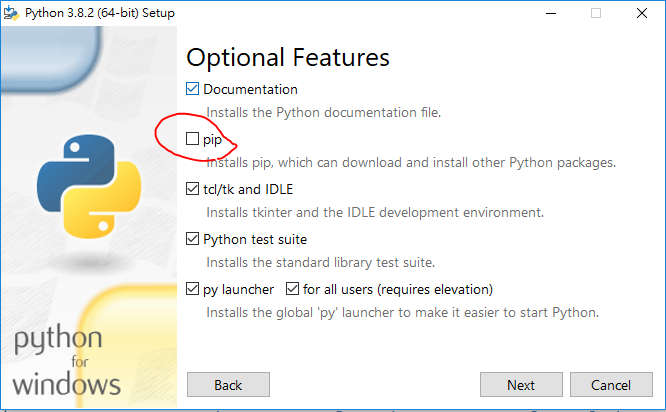
3.下載完成後開啟,選擇Customize installation(訂製化安裝)選項

4.不要勾選pip選項,接著按下next

5.選擇路徑將python安裝至可攜式系統中的Y槽下

6.接著開啟start_mdecourse.bat批次檔

7.將start_mdecourse.bat批次檔中的py373改為安裝python 3.8.2版本的資料夾

8.將安裝的版本資料夾取名為py382
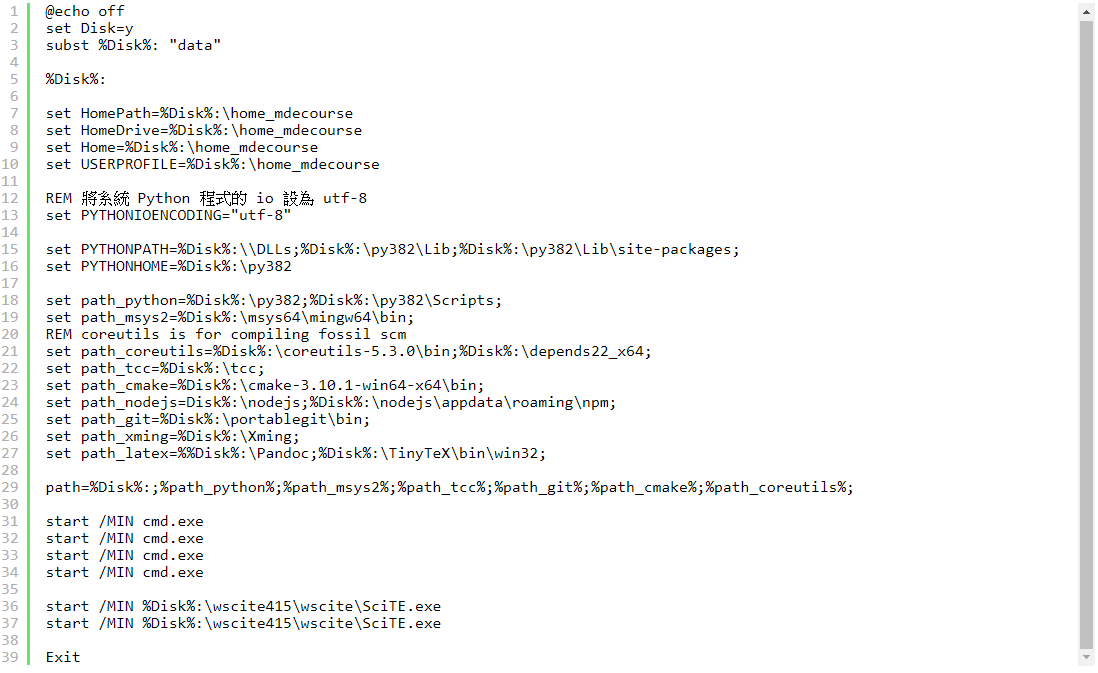
8.執行stop.bat批次檔後重新啟動start_mdecourse(為了讓檔案重新讀取)

9.輸入get-pip.py,開始安裝pip工具

10.安裝cmsimde所需模組

11.檢查版本是否更新至 python 3.8.2


week3 << Previous Next >> week5

Copyright © All rights reserved | This template is made with by Colorlib